Showing posts with label Freeware Antivirus. Show all posts

Tuesday, January 5, 2010

W32.Sality.AE Manually Repair & Removal

The virus is often detected by antivirus Sality name or W32Sality.AE is a lot of viruses spread through a network that uses the default share windows or share a folder with full access. Sality virus will attack and inject much berekstensi *. exe files, disable the task manager, disable regedit and make your windows can not be done in save mode. And worse, it could damage Sality some *. exe files to berekstensi can not be used again.

To Remove it automatically, you can update your antivirus and use of scanning and repair thoroughly. But if your antivirus did not resolve this sality virus attack, then you can manually Removal. How to remove the virus W32Sality.AE or more often known by the name of this virus sality manually from your computer? I offer the following tips and how to remove the virus without mercy and guarantees 99% success :)

1. Disconnect your computer from any network, whether LAN or the Internet.

2. Turn off your system restore feature during the process of clearing the virus sality

3. Download Sality Repair here

4. Extract the file and right click SalityRepair repair.inf files then right click and click Install

5. Turn off all active applications and you are viewing

6. Download Norman Malware Cleaner here or download directly here

7. Change the extension of Norman Malware Cleaner. Exe to. Cmd application to Norman Malware Cleaner is not infected by the virus sality

8. Perform Norman Malware scanning using Cleaner.cmd (extension. Exe you have a fox. Cmd)

9. Restart your computer after the cleaning process is complete

10. Download FixReg here

11. extrack FixReg.rar and run the registry in a folder FixReg according to the windows you use.

12. Restart your computer.

13. Check regedit etc. managerm task to make sure your computer has recovered. You can also scan in safe mode to make sure your computer is correct - really clean from the virus sality.

Actually, almost all antivirus can detect and remove this virus sality. You can update your antivirus and do the scanning and repair using the antivirus you use. If your antivirus was not able to remove it, then remove the virus sality tips manually above can be a powerful solution free from attack W32Sality.AE

Continue Reading >>

Scan Virus in DOS using McAfee Antivirus

McAfee offers antivirus for use in the DOS environment. This tool is suitable for computer technicians because without the installation process, but it has proved a powerful antivirus.

This antivirus should not be used directly on a computer that contracted the virus since many files that can not be opened, the file is being used by Windows. So put on your hard drive off another computer or most practical way, booting using Hiren Boot CD select Mini Windows XP.

The following steps should be taken:

1. McAfee SuperDAT download here

2. select the file sdatXXXX.exe, XXXX indicates updated version (more or less the size of 110MB, a very large measure due to the virus definition database)

3. Save the file in the folder c: \ sdat (optional, adjust to your needs)

4. Sign in MS-DOS prompt (Start - Run - type cmd - Enter)

5. Type: cd \ sdat (Enter)

6. Do extract the file with the command: sdatXXXX.exe / e (Enter) - extract command was slow because of the large size of the file.

7. To scan, there are various command line include:

- Scan all local drives and sub-directory, all files: scan / all / adl / sub clean

- Scan the drive c: only all files: scan c: / all / sub / clean

- Scan the drive c: and d: all files in the log: scan c: d: / all / sub / clean / report c: \ log.txt

8. In the end scans, will appear Summary Scan results

If you want to update the virus definitions, then the following steps:
1. Download update the definition (DAT) here
2. Select file dat-XXXX.zip (Select the Windows & Netware File size approximately 65MB)
3. Extract the files in the folder where you extract the SuperDAT, example: c: \ sdat, Overwrite the file if its have questions..

Continue Reading >>

Thursday, December 10, 2009

Net-Worm.Win32.Kido.ih Removal

computer_worm This worm spreads via local area networks and removable storage media. When Net-Worm.Win32.Kido.ih copies itself to remote computers, the worm creates a temporary file with a random extension. The worm itself is a Windows DLL Library file. The worm components vary in size from 155KB to 165KB and packed with UPX.

Once the Net-Worm.Win32.Kido.ih worm infected, it creates a system service which launches the worm’s executable file each time Windows is booted. The following registry key will be created :

[HKLM\SYSTEM\CurrentControlSet\Services\netsvcs]


And then modifies the following windows registry key value:


[HKLM\SOFTWARE\Microsoft\Windows NT\CurrentVersion\SvcHost]
"netsvcs" = "<original value> %System%\<rnd>.dll".


The Net-Worm.Win32.Kido.ih worm then launches an HTTP server on a random port, then used to download the worm's executable file to other computers in the same network as the victim machine and attacks via a buffer overrun vulnerability (MS08-067) in the Server service.


The Net-Worm.Win32.Kido.ih worm copies its executable file to removable media under the following name:


<Drive>:\RECYCLER\S-<%d%>-<%d%>-%d%>-%d%>-%d%>-%d%>-%d%>\<rnd>.vmx,


In addition to its executable file, the worm also creates file shown below in the root of every disk:


<Drive>:\autorun.inf


This file will launch the worm's executable file each time Explorer is used to open the infected removable drive.


Download Net-Worm.Win32.Kido.ih Removal Tools here

Continue Reading >>

Wednesday, December 9, 2009

The Latest Microsoft Security Essentials | Freeware Antivirus from Microsoft

Microsoft-Security-Essentials-logo Microsoft Security Essentials is a free antivirus software from Microsoft that is the development of Microsoft Live OneCare in the end year of 2008 that commercial. But to be able to use the Microsoft Security Essentials to pass the WGA validation process (Windows Genuine Advantage Validation). Microsoft Security Essentials provides a real-time protection for your PC that guards against viruses, spyware, and other malicious software.
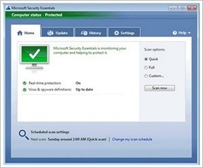

Microsoft Security Essentials picture Microsoft Security Essentials on the latest virus definition updates is easy, when you connect to the Internet, Microsoft Security Essentials will automatically update so you do not have to worry about the latest update. Microsoft Security Essentials does not require high specification PCs, because its walked in the background and it doesn't use a lot of system resources.

You can find the download information here : http://www.microsoft.com/security_Essentials/

Continue Reading >>

Ansav 2.0.50 Latest Update

logo-ansav-2.0.50 Ansav 2.0.50 Update October 2009, Ansav Antivirus is one of the most widely used by Windows-based computer users in Indonesia, so far Ansav is the only antivirus which features the plugin to support and optimize the work in addition to portable and features kesederhana'an its user interface.


ansav Latest  Ansav 2.0.50 from Anlab Software comes with the addition of a new virus database, to update 05 October 2009. For antivirus Ansav users are strongly encouraged to update to Ansav can recognize more virus signature. In this update Ansav developer has added new features and improvements.

You can find the latest download link Ansav 2.0.50 here : http://www.ansav.com/

Continue Reading >>

Update SmadAV Antivirus 2009 Rev. 7.4

Logo  Update SmadAV Antivirus 2009 Rev. 7.4 Update SmadAV Antivirus 2009 Rev. 7.4, SmadAV antivirus Antivirus is very popular in Indonesia, SmadAV Antivirus can recognize 2000+ virus signatures, portability and ease of installation make this antivirus is very user friendly.

In Update SmadAV Antivirus 2009 Rev. 7.4, is the latest time SmadAV improved to be faster and lighter in detecting and securing your computer from virus attacks. New features added such as Turbo-Smad, Smad-Theme, Smad-Ray. This new feature makes SmadAV still be used on computers with lower specifications.

 Update SmadAV Antivirus 2009 Rev. 7.4

In this Update, SmadAV Antivirus 2009 Rev. 7.4 also adds a new virus database.SmadAV also made improvements to the user interface SmadAV Rev. 7.4 Antivirus for SmadAV overall easier and practical to use. Below is an explanation of the new features in SmadAV 2009 Rev 7.4:

  • Smad-Turbo (Scanning the virus 10 times faster)
    Smad-Turbo is one of the fast scanning feature that exist only on SmadAV Pro version. If on your free SmadAV takes 30 minutes to scan all files on a computer, by using this feature you only need to take approximately 1 to 3 minutes to scan all files on your computer.
  • Smad-Theme (Changing color themes)
    SmadAV Pro has a feature to change the color theme is green SmadAV into several color options (Like the ANSAV Beta 2).
  • Smad-Ray (Auto flash is very fast scan)
    After flash-disk you plug in your computer, SmadAV will direct the process of scanning and displaying the scan results and information on whether your flash is infected with a virus or not, the process is very fast only about 5-7 seconds so you do not have to wait long to scan the flashdisk.

Antivirus 2009 Update SmadAV Rev. 7.4 can be downloaded here : http://www.smadav.net/download

Continue Reading >>

  ©Template by Dicas Blogger.

TOPO