How to fix generic host process error
If you get a message Generic Host Process Error then connection to the Internet and LAN network is lost, maybe your computer has been infected with Conficker. The ability of the virus spread Conficker really aggressive.
Not limited to portable storage media like USB or memory card Flashdisk it but this virus can spread through a LAN network using bug (security holes) RPC DCOM service 3 which is an existing network operating system based on Windows 2000 or XP.
Conficker able to disable System Restore to reset the way "Restore Point" To prevent the victim eradicate this virus with the return path Restore Point. At the infected computer, Conficker will perform the function as a web server (HTTP server) to the local network. If any computer on a local network vulnerable DCOM RPC 3, then he will attack and if successful the victim's computer will download to the HTTP server had to then download and run the virus file.
Solution :
- You may download the patch for RPC DCOM bug from Microsoft here :http://www.microsoft.com/technet/security/Bulletin/MS08-067.mspx
- Download Removal Tools from Antivirus Update here : http://free-antivirus-updates.blogspot.com/2009/12/w32conficker-and-w32downadup-removal.html

 Win32/Conficker has ranked the most extensive global threat was towards the end of the past year.Compared with previous variants, the latest variant is even more aggressive thanks to its ability to block the antivirus signature. To increase the destructive power even further, the creators have added functionality to spread by way of letting the USB key.
 Microsoft Security Essentials is a free antivirus software from Microsoft that is the development of Microsoft Live OneCare in the end year of 2008 that commercial. But to be able to use the Microsoft Security Essentials to pass the WGA validation process (Windows Genuine Advantage Validation). Microsoft Security Essentials provides a real-time protection for your PC that guards against viruses, spyware, and other malicious software.
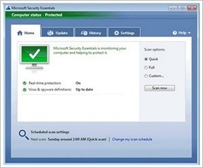 Microsoft Security Essentials on the latest virus definition updates is easy, when you connect to the Internet, Microsoft Security Essentials will automatically update so you do not have to worry about the latest update. Microsoft Security Essentials does not require high specification PCs, because its walked in the background and it doesn't use a lot of system resources.