Scan Virus in DOS using McAfee Antivirus
McAfee offers antivirus for use in the DOS environment. This tool is suitable for computer technicians because without the installation process, but it has proved a powerful antivirus.
This antivirus should not be used directly on a computer that contracted the virus since many files that can not be opened, the file is being used by Windows. So put on your hard drive off another computer or most practical way, booting using Hiren Boot CD select Mini Windows XP.
The following steps should be taken:
1. McAfee SuperDAT download here
2. select the file sdatXXXX.exe, XXXX indicates updated version (more or less the size of 110MB, a very large measure due to the virus definition database)
3. Save the file in the folder c: \ sdat (optional, adjust to your needs)
4. Sign in MS-DOS prompt (Start - Run - type cmd - Enter)
5. Type: cd \ sdat (Enter)
6. Do extract the file with the command: sdatXXXX.exe / e (Enter) - extract command was slow because of the large size of the file.
7. To scan, there are various command line include:
- Scan all local drives and sub-directory, all files: scan / all / adl / sub clean
- Scan the drive c: only all files: scan c: / all / sub / clean
- Scan the drive c: and d: all files in the log: scan c: d: / all / sub / clean / report c: \ log.txt
8. In the end scans, will appear Summary Scan results
If you want to update the virus definitions, then the following steps:
1. Download update the definition (DAT) here
2. Select file dat-XXXX.zip (Select the Windows & Netware File size approximately 65MB)
3. Extract the files in the folder where you extract the SuperDAT, example: c: \ sdat, Overwrite the file if its have questions..

 Win32/Conficker has ranked the most extensive global threat was towards the end of the past year.Compared with previous variants, the latest variant is even more aggressive thanks to its ability to block the antivirus signature. To increase the destructive power even further, the creators have added functionality to spread by way of letting the USB key.
 Microsoft Security Essentials is a free antivirus software from Microsoft that is the development of Microsoft Live OneCare in the end year of 2008 that commercial. But to be able to use the Microsoft Security Essentials to pass the WGA validation process (Windows Genuine Advantage Validation). Microsoft Security Essentials provides a real-time protection for your PC that guards against viruses, spyware, and other malicious software.
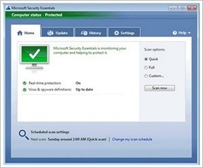 Microsoft Security Essentials on the latest virus definition updates is easy, when you connect to the Internet, Microsoft Security Essentials will automatically update so you do not have to worry about the latest update. Microsoft Security Essentials does not require high specification PCs, because its walked in the background and it doesn't use a lot of system resources.

 Update SmadAV Antivirus 2009 Rev. 7.4, SmadAV antivirus Antivirus is very popular in Indonesia, SmadAV Antivirus can recognize 2000+ virus signatures, portability and ease of installation make this antivirus is very user friendly.
